

Summer Camp Attendance Tracking & Check In

No clipboards. No extra spreadsheets. No guesswork. Just fast, built-in check-in and check-out workflows designed for real camp operations.
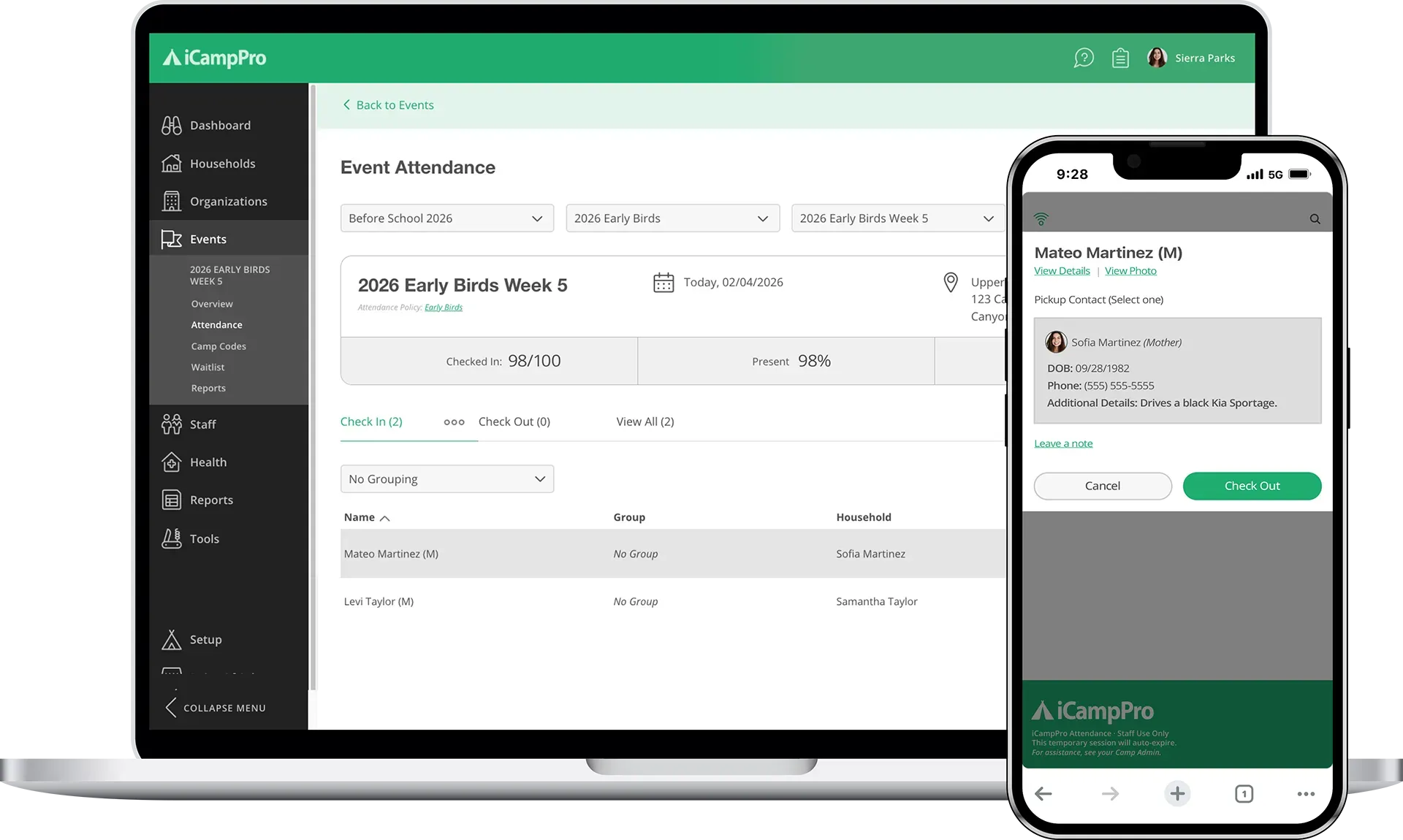
Access attendance tools from desktop or mobile devices and commit to less paperwork, faster service, and smoother camper arrivals and departures. 

Laptop and phone showing a care app interface.

Camp Attendance, Simplified.

Envision smoother drop-off and faster pickup with our smart attendance workflows! Watch this video to get a short rundown of these features in action. 

A hand is pressing a play button on a computer screen surrounded by icons.

User Friendly Camp Attendance on Desktop or Mobile

Your team can log into the full software or use a dedicated mobile-friendly device view for maximum flexibility and maintain access control. Each camp event starts with a list of registered campers and the option to check in or view details. As campers are checked in, they clear from view so your team can work the list down to zero and know exactly who’s missing. 

Laptop screen with a scale balancing a padlock and a checkmark.

One-Tap Camp Check In

Find campers quickly by searching or scrolling. Check them in with one tap. Have two campers with similar names? No problem! View more details to confirm household information with their parent or guardian. 

A laptop computer with a stack of boxes and a check mark on the screen.

Flexible Camp Check Out

Your camp can choose between a simple one-tap check out process and an authorized pickup confirmation workflow. With pickup confirmation enabled, your team can identify designated pickup persons from camp forms and add notes. 

A laptop computer with a stack of boxes and a check mark on the screen.

Camp Attendance Overview

Easily view attendance status across all campers for an event. Staff can easily see which campers are checked in, checked out, or marked absent—helping teams respond to questions quickly and confidently throughout the day. 

Create camper pickup forms that work around your timelines. Not the other way around. Attach designated camper pickup forms to camp events to set custom deadlines and control when families can add or update authorized pickup contacts. Families submit changes online, so your staff always has accurate, up-to-date pickup information—without the paperwork or last-minute confusion. 

Manage Authorized Pick Up with Online Camper Forms

Woman holding phone displaying a gear/circuitry icon.

Built-in Attendance for Every Type of Camp Event

Our digital attendance tracking is built directly into iCampPro’s features. No extra setup, paid services, or app install required. Staff users can access everything from a browser on any web-enabled device with secure login credentials. 


Print a QR for quick access to a more mobile-friendly interface to use on tablets or phones! 


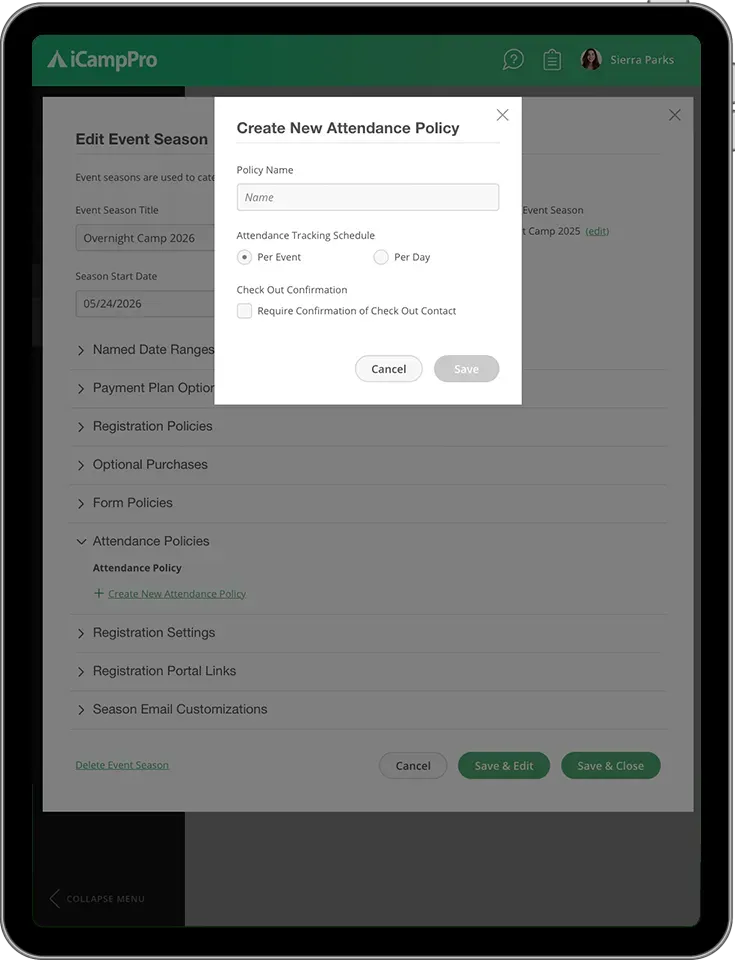
Flexible settings let your camp choose how attendance works, from simple check-in and check-out to authorized pickup confirmation and optional daily attendance. One-click check-in keeps lines moving, while smart, time-limited undo tools allow teams to quickly fix mistakes without calling an admin. 


Whether you’re running one event or many across multiple locations, your team always knows who’s checked in, who’s absent, and who’s cleared for camper pickup. 


Talk to us about camp attendance:

Person using a tablet; screen shows a list of files, hand touches the screen.

Running Supervised Team Camp Check In & Check Out

These check in and check out tools are designed for staff members to operate, not parents. Having team members engaged in check in and check out creates confidence that campers are safe and accounted for during some of camp's most hectic handoffs. Plus, it enables your team to greet camp families with a warm welcome, build more trust, manage complications or last-minute confirmations, and leave them with a great first and last impression. 

An icon of a delivery truck with a pin on it.

Time-Saving & Eco-Friendly

Digital camp attendance is fast, friendly, and reduces paper waste. It eliminates double entry, saving teams time and resources for other camp initiatives. 

An icon of a delivery truck with a pin on it.

Added Speed & Convenience

With fast camper search tools and team-oriented workflows, you can keep check-in and pickup lines moving, even during the busiest times of your day. 

An icon of a person and a gear on a green background.

Better Pickup Experiences

Authorized pickup verification helps teams ensure that campers leave safely. Families feel confident when they can manage pickup without complications. 

A green icon with three dollar signs and three arrows pointing up.

Ensuring Camper Safety

Need to confirm a camper’s status quickly? Event attendance is searchable and easy to follow. Authorized staff can easily view history and answer questions. 

Attendance information is logged in detail, stored securely, and available whenever you need it. Review past attendance to confirm camper participation. Authorized users can also make corrections with detailed logs showing what changed, who did it, and when. Our tools help teams hold staff members accountable without hindering daily operations.

Access Camp Attendance History Anytime

A cartoon of a man selling camp youth shirts

Key Takeaways for Camp Attendance

  • Built-in camp attendance with no extra apps or setup required. 
     
  • Fast, one-tap check-in and flexible check-out workflows that keep lines moving.

  • Authorized pickup verification helps ensure campers leave safely and confidently. 
     
  • Real-time attendance visibility so staff always know who’s present or absent. 
     
  • Access from a desktop or mobile browser for front office and on-the-go teams.

  • Detailed attendance tracking with secure access, records, and audit logs.
Key Takeaways graphic

Camp Check In & Attendance FAQs

A green square with a white tag with a percent sign on it.
  • Can multiple staff members take attendance at the same time?

    Yes! Multiple staff users or volunteers that are given login access and permissions can help check campers in and out simultaneously for the same event using different devices. This design helps larger camps assemble teams to manage busy arrival and pickup periods with ease. Camp attendance data is updated in real time. 

  • Can I run check in for multiple events at the same time?

    Our attendance views are designed to pull up one event at a time.  However, you can assign different team members to check campers in and out for separate events or have them use separate browser tabs per event. 

  • Can my camp still use paper attendance if needed?

    Yes. While iCampPro’s camp attendance workflows help you reduce paperwork, camps can still print out paper backups for check in and check out as needed. 

  • Can campers be checked in and out multiple times per day?

    Absolutely. iCampPro supports multiple check-ins and check-outs, making it easy to manage late arrivals, early pickups, or campers who have to leave and return one or more times during the same event. 

  • How does iCampPro handle absent campers or late arrivals?

    Staff can mark campers as absent if they don’t show up for check in. This can be temporary or for the whole day. This keeps attendance records accurate for late arrivals and gives teams clear visibility into who is expected to be on the property at any given time. 

Learn about iCampPro and more on our blogs!